70
Commands
1149
Tests
8
Distros
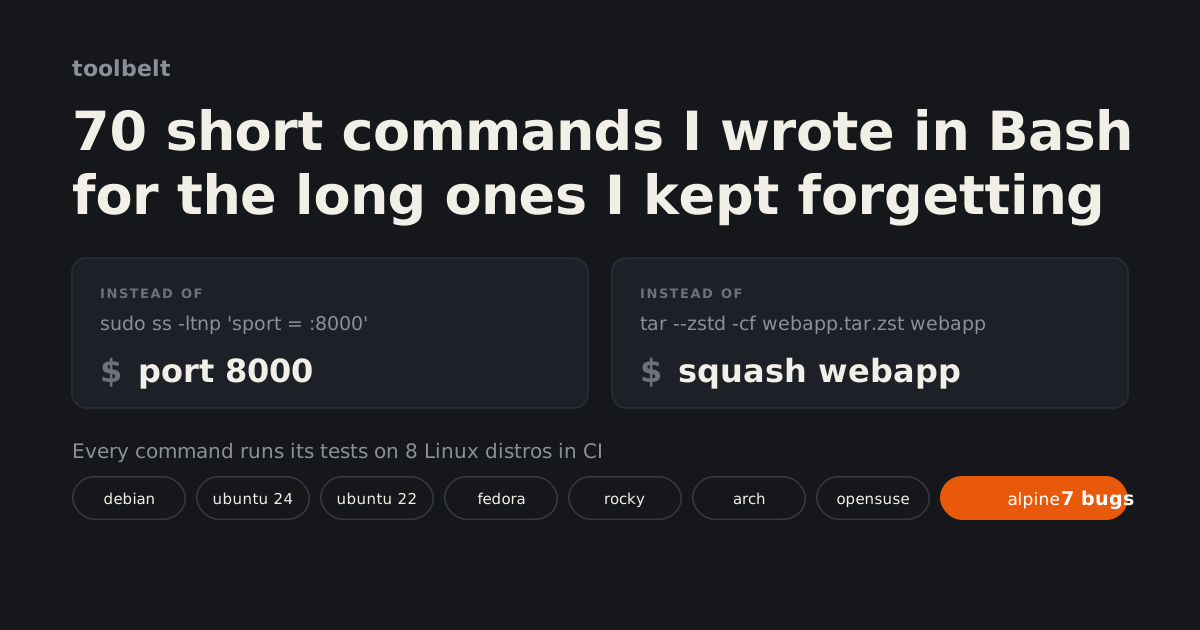
It started with one command. I kept getting .rar and .7z files and looking up how to open each kind, so I wanted
unpack, one command that opens any archive. Then I kept adding the commands I looked up every week. The tar
flags for zstd. Which process holds port 8000. Why a pod sits in Pending.
I built toolbelt with AI. I decided what each command should do and checked the results on every distro. An AI coding assistant wrote most of the Bash and helped me write this post.
It installs for one user, with no sudo:
$ curl -fsSL https://raw.githubusercontent.com/khadirullah/toolbelt/main/install.sh | bash
$ toolbelt doctor
The same install, and you can read the script first.
$ git clone https://github.com/khadirullah/toolbelt.git
$ cd toolbelt
$ ./install.sh
$ toolbelt doctor
Removes the links, man pages and completion files the installer made, its line in your shell startup file,
and ~/.local/share/toolbelt. A link that no longer points into toolbelt stays.
$ toolbelt uninstall
What it does#
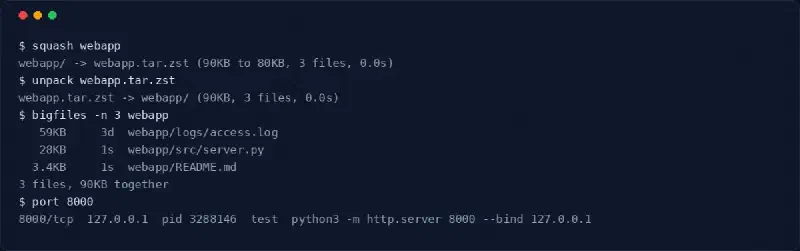
The commands fall into eight groups:
| Group | Some of the commands |
|---|---|
| Archives | unpack, squash, archdiff |
| Files | bigfiles, recent, dupes, bulkrename, mirror |
| System | mem, proc, disks, logs, seccheck, schedules |
| Network | port, myip, netcheck, sshfwd, waitfor |
| Everyday | genpass, timer, epoch, clip |
| Kubernetes | kwhy, ksecret, kyaml, kclean, kfwd, kres, knodes, kevents |
| DevOps | certcheck, dnscheck, tfcheck, jwtpeek, git-undo |
| Shell | mkcd, up |
If you work with Kubernetes you probably use k9s, and it is the better tool for looking around a cluster. The k
commands are for when I already know the question: why is this pod not Ready, what is in this Secret, how much of
the node is really used. Each one prints its answer and exits, so it works over SSH, in a CI log or in a runbook, on
any machine with kubectl.
Every command follows the same contract, and CI checks its help, docs page and man page on every push.
Help on one screen
--help fits on one screen and has examples.A full manual
Tab completion
--help, so it never goes stale.The same exit codes
Missing tools, named
unpack: needs 7z. Install it with: sudo apt install 7zip, with the package name for your distro.That last rule is where eight distros came in.
Why eight distros#
The same command has different names and different flags across distros. Debian and Ubuntu use apt, Fedora and
Rocky use dnf, Arch uses pacman, openSUSE uses zypper and Alpine uses apk. Package names differ too. dig comes
from bind9-dnsutils on Debian, bind-utils on Fedora, bind on Arch and bind-tools on Alpine.
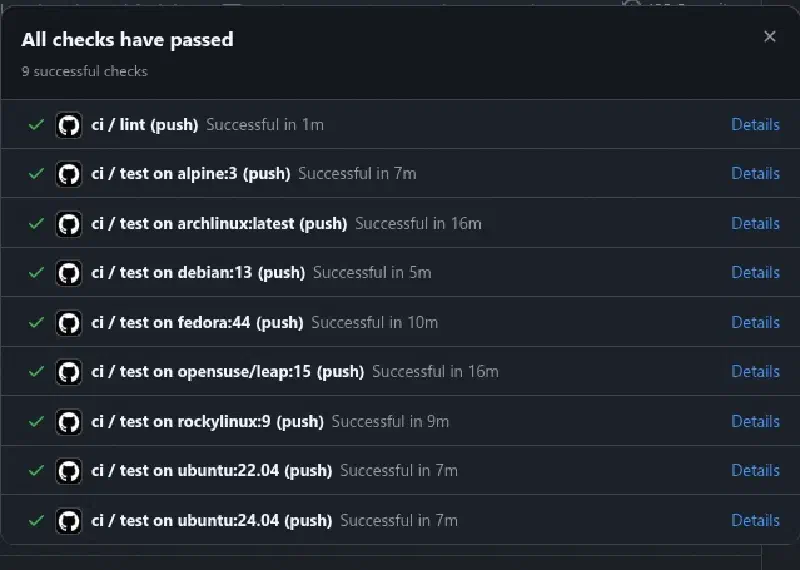
So CI runs the whole test suite in a container for each of eight images:
On six of the eight, a second step checks that every package name toolbelt suggests really exists in that distro’s repos. If a name is wrong, the install hint is wrong, and the job goes red.
I nearly left Alpine out, since few people run it on a desktop. But it is the base of a great many container images, so toolbelt will meet it. It turned out to be the most useful job in the matrix.
Alpine found the most bugs#
Alpine uses BusyBox, one small binary that stands in for sed, date, find, readlink, split and most of
coreutils. The BusyBox versions cover the common flags and leave the rest out. Every GNU-only flag in the code was
a bug waiting there:
| Command | What BusyBox lacks | What broke | The fix |
|---|---|---|---|
mirror | readlink -m | every local mirror stopped | resolve the part of the path that exists |
squash -s | split --numeric-suffixes | splitting failed | write lettered parts, rename them .001 on |
logs --since today | date -d today | exited 2 | work out today and yesterday itself |
epoch | ISO 8601 in date -d | refused 2026-09-29T09:00:00Z | hand date the plain part, apply the zone itself |
ksecret | openssl’s date format | no days-left count | one shared parser for certificate dates |
| folder sizes | find -printf | sizes rounded to the KB | stat per file |
bulkrename | sed --sandbox | see below | see below |
bulkrename renames files with a sed expression, such as s/IMG_/photo-/. GNU sed has a --sandbox flag that
refuses the w command, which writes a file, the r command, which reads one, and the e command, which runs a
program. BusyBox sed has no sandbox. It refuses e, but it runs w and r. On Alpine, an expression with w
emptied a file even during the syntax check before any rename, and one with r could read any file I can. That
was a security bug, not a portability one. The fix accepts only s and y commands when sed has no sandbox.
The lesson I kept is that a GNU flag feels like part of Bash, and it is not. The epoch and ksecret date tests now
also run through busybox date on any machine that has busybox installed, so a plain Debian run catches those Alpine bugs too.
Tests that could not fail#
bats runs each test with set -e, so any failing command fails the test. Except one kind. Bash ignores set -e
for a command that starts with !. So this line passes whether grep finds a match or not:
! grep -q port-forward calls # never fails the testThe suite had 35 checks written this way, each one guarding something that must not happen. None of them could catch it. I replaced them with a small helper that fails when the command succeeds:
not() {
    if "$@"; then
        echo "expected to fail: $*" >&2
        return 1
    fi
}

not grep -q port-forward calls    # fails the test if grep matches
All 35 still passed locally, in a Docker container for each of the eight distros. Then I pushed.
The bug that only happened on GitHub#
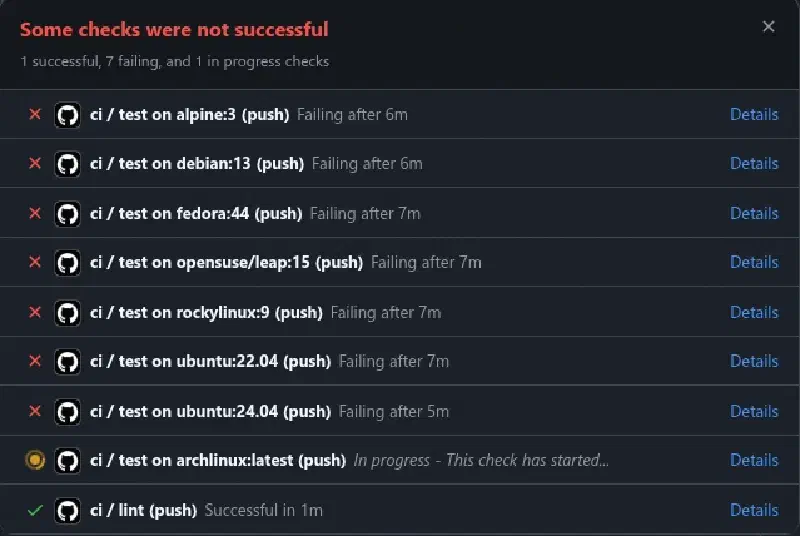
Every job failed on the same test. sshfwd -b opens an SSH tunnel in the background, and sshfwd --stop closes
it. The test checked that the tunnel’s process was gone with not kill -0 "$master". It had been a harmless
! kill -0 until earlier that day, and now it was real.
On GitHub the process was still there. It had not survived being killed. It had become a zombie.
When a process ends, it stays in the process table until its parent reads its exit code. If the parent is
already gone, the process is handed to PID 1, and PID 1’s job is to read that exit code and let it go. A real
init system does this. GitHub Actions starts job containers with tail -f /dev/null as PID 1, to keep them
running, and tail never does it. So on GitHub, every orphan that ends stays a zombie forever.

kill -0 PID asks whether a process exists. A zombie exists. So the check said the tunnel was still up.
The commands themselves had hit this the night before. sshfwd waited for its tunnel to drop and hung, and
port -k reported a stopped process as still running. The fix there reads the process state from
/proc/PID/status, where a zombie shows as Z. The test needed the same thing:
gone() {
    if kill -0 "$1" 2>/dev/null && ! grep -qs '^State:[[:space:]]*Z' "/proc/$1/status"; then
        echo "expected pid $1 to have ended" >&2
        return 1
    fi
}
To prove it before pushing, I started an Alpine container the way GitHub does, with tail -f /dev/null as PID
1, and ran the test inside with docker exec. The old check failed there, just as on GitHub, and the new one
passed. Later I repeated it on Debian. The old check failed three runs out of three, and the new one passed ten
runs in a row.
Tests that depend on the clock#
Three more tests failed once each, two in my local Docker runs and one on GitHub, and passed the next time. All three read the clock and assumed no time would pass before the command under test did.
A timer due in exactly one day and one hour
flake 1
The test made a systemd timer due exactly 90000 seconds after it read the clock. On a busy Alpine run one second passed beforeschedulesran, and1d 1hbecame1d 0h. The fix gives it thirty seconds of slack, as the logrotate timer beside it already had.A two hour timer that showed 2:00:00
flake 2
timerrounds the time left up. When the test read the clock exactly on the minute andtimerstarted in the same second, it showed2:00:00, which the pattern did not allow. It failed about one run in sixty. The pattern now accepts it.A new file that was one second old
flake 3
Thebigfilestest expected0sfor files made in its setup. On a slow runner the second ticked over first, and Debian failed once on GitHub. The files are now made two hours old, so they read2hhowever slow the runner is.
Each fix moved the fixture away from the edge. A rerun would have turned each job green, but a test that fails at random teaches you to rerun without reading, and that is how a real failure gets through.
Running CI on my own machine#
The zombie bug showed that passing locally meant little if my containers did not start the way GitHub’s do.
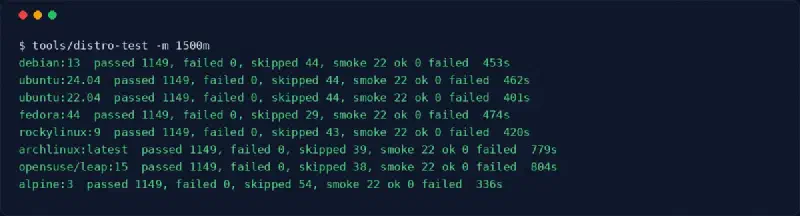
tools/distro-test runs CI’s test job locally.
It reads the image list and the install step from the workflow file, so it cannot drift from CI. It starts each
container with tail -f /dev/null as PID 1, like GitHub does. After the tests it installs toolbelt as a normal
user, runs 19 commands and uninstalls it.
$ make distro-test                      # all 8, one at a time
$ tools/distro-test -m 1500m            # cap each container at 1.5 GB
$ make distro-test D=alpine:3
$ tools/distro-test -t tests/sshfwd.bats debian:13    # one test file
$ tools/kind-lab up
$ eval "$(tools/kind-lab env)"
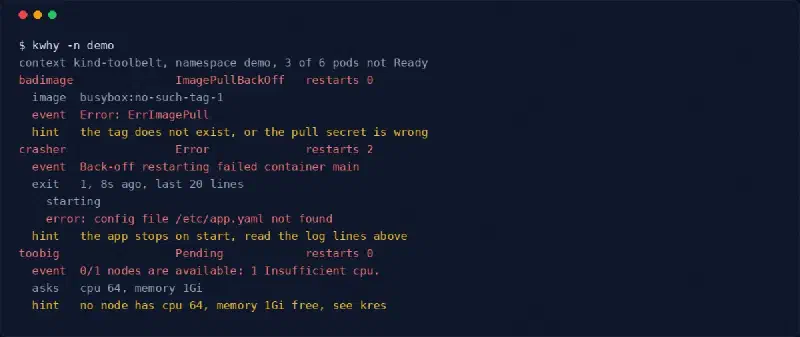
$ kwhy -n demo
$ tools/kind-lab down
Every distro runs the same 1149 tests, yet openSUSE and Arch take more than twice as long as Alpine.
The Kubernetes commands need a real API server, which a unit test cannot give them. tools/kind-lab up makes a
throwaway kind cluster with a namespace of things going wrong: a pod that crashes, one with an image tag that
does not exist, one that asks for 64 CPUs. It keeps its own kubeconfig, so the cluster I normally use stays
untouched. The uptime checker in
A DevSecOps pipeline with a real application behind it runs on kind
too.
What I would do differently#
- Put the smallest distro in CI on day one. Alpine found most of the portability bugs.
- Start test containers the way CI does. A
docker runwith a shell as PID 1 hides whattailas PID 1 does to orphans. - Search the tests for
!before trusting them. A check that cannot fail looks exactly like one that passes. - Keep fixture times far from any rounding edge. A second is a long time on a shared runner.
The full testing guide, including how to set up a machine from nothing, is in TESTING.md.